
Modules/Screen Recording
Record your screen when a still frame is not enough
Record the full screen, a window or an area, with sound from your speakers and microphone, plus your webcam. Keep the video on disk, upload it to the cloud, or both.
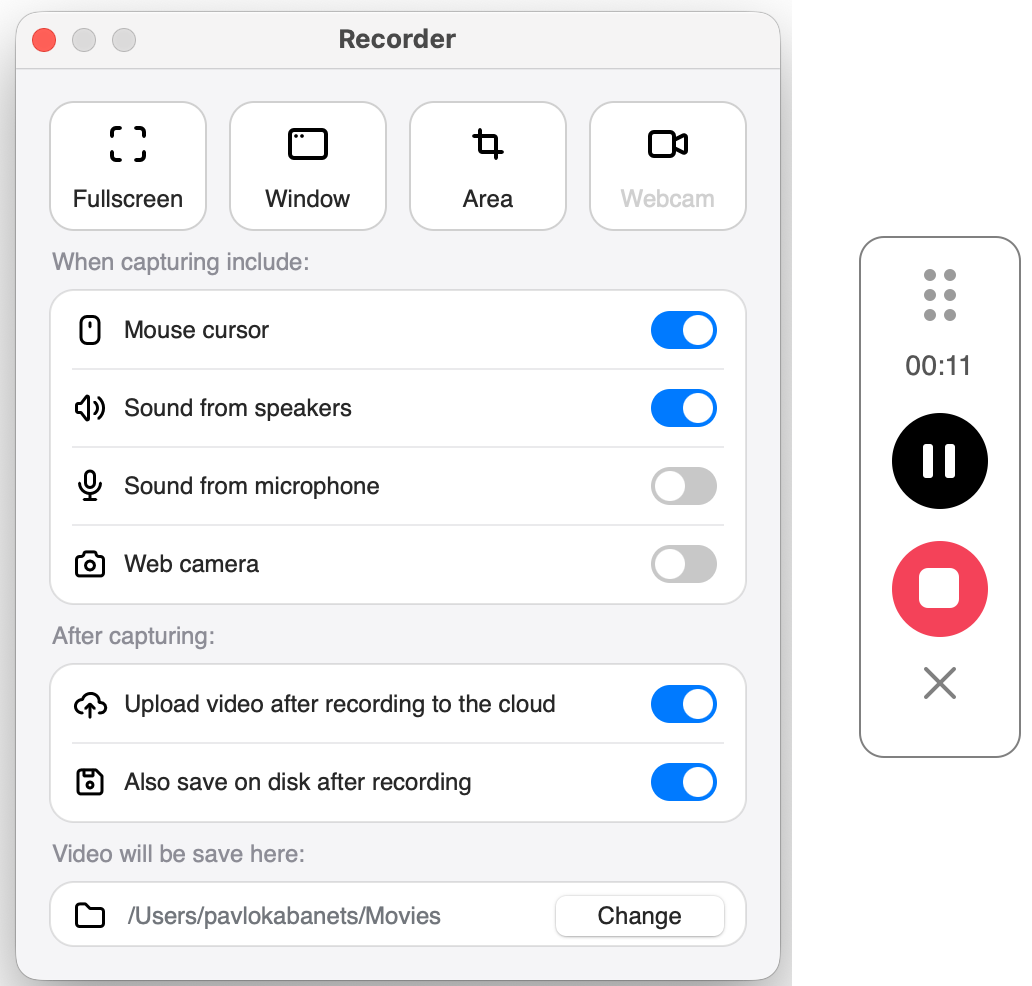
Set it up once, then press record
Choose what to record
Full screen, a window or an area, with or without the mouse cursor.
Add sound and camera
Sound from your speakers and your microphone, plus the web camera, each with its own switch.
Stop and keep it
Stop from the floating controls. The video is saved to your folder, uploaded to the cloud, or both.
Set it up the way you record
Full HD and H.264
Set 1080p and the H.264 codec in Settings, under Video: high quality at a manageable file size.
Your audio and video inputs
Choose them in Settings, under Video.
Upload when it ends
Turn on upload after recording and the video goes to the cloud when you stop.
A copy on disk
Keep “Also save on disk after recording” on and a local copy stays in your folder, even when the video is uploaded.
Screen Recording questions
What can I record?
The full screen, a single window or an area you select, with or without the mouse cursor.
Can I record my voice and my webcam?
Yes. Turn on sound from the microphone and the web camera in the Recorder. Sound from your speakers can be recorded too.
What quality are the videos?
You set them in Settings, under Video, for example 1080p (Full HD) with the H.264 codec.
Where do my recordings go?
To the default folder for video, which you can change. With upload after recording turned on, they go to the cloud, and a copy stays on disk if “Also save on disk after recording” is on as well.
Record your first video
Download PixelTaken free. The Recorder is part of the app.